
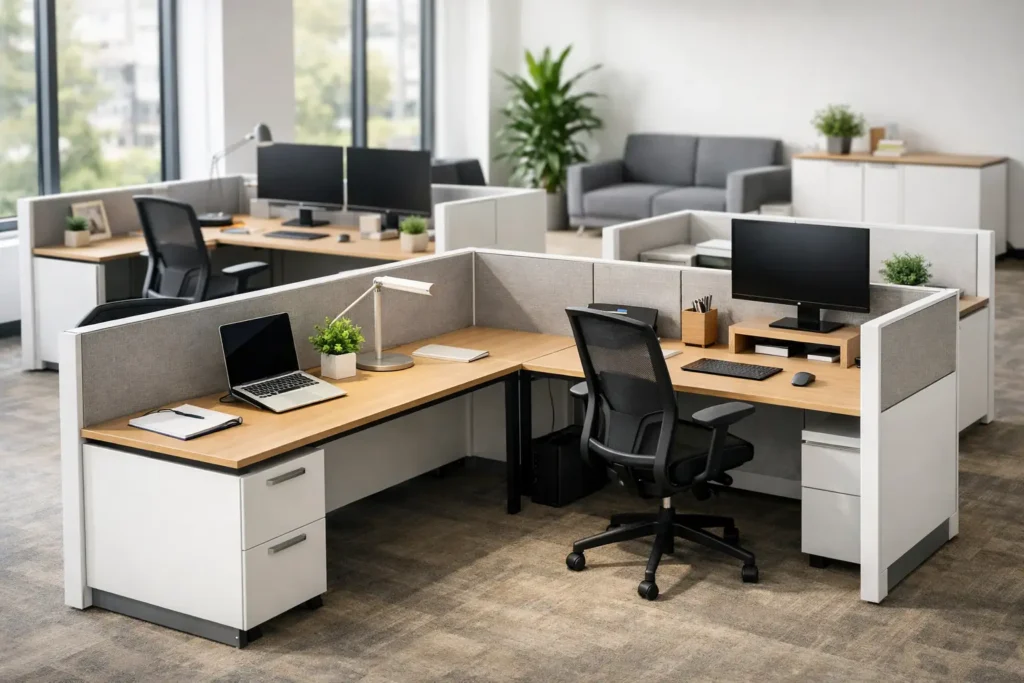
Office Furniture Modular Workstations Guide
A workstation layout that looks efficient on paper can fail fast once a team starts using it. Circulation gets tight, storage falls short, cable management becomes an afterthought, and any future headcount change turns into a costly reset. That is why office furniture modular workstations continue to be a practical choice for commercial interiors that need flexibility without giving up consistency, performance, or visual control.
For business owners, facility teams, designers, and project managers, the appeal is straightforward. Modular systems make it easier to furnish open offices, private team zones, call centers, hybrid departments, and multi-phase expansions with a coordinated approach. The real value is not just that components can be reconfigured. It is that a well-planned system supports day-to-day operations now while reducing disruption when the space changes later.
What office furniture modular workstations solve
Most office projects are balancing the same pressures: square footage, budget, employee comfort, brand presentation, and installation timelines. Traditional freestanding desks can work in certain environments, especially where every user needs a distinct setup and future growth is unlikely. But in many commercial settings, they create too many one-off decisions. Each desk, pedestal, screen, and accessory becomes a separate specification issue.
Office furniture modular workstations simplify that process by creating a repeatable planning framework. Shared panel systems, benching structures, divider options, integrated power access, and coordinated storage allow a project team to make decisions at the system level rather than item by item. That becomes especially useful when furnishing larger teams or standardizing across departments, floors, or locations.
The other advantage is control. A modular workstation system lets you establish a consistent footprint, maintain clear aisles, and support a cleaner visual line across the office. In a client-facing environment, that consistency matters. In a high-use operational environment, it matters even more because standardized layouts are easier to maintain, replace, and expand.
How to evaluate office furniture modular workstations
The right system starts with function, not catalog aesthetics. Before reviewing finishes or divider styles, it helps to define how each team actually works. A sales group on headsets has different acoustic and power needs than a design team working across dual monitors and physical samples. Administrative staff may need more enclosed storage, while hybrid users may need touchdown flexibility and easier reset between shifts.
Space planning is the next filter. Modular workstations are often selected to improve density, but density alone is not a win if it compromises usability. Leg clearance, monitor depth, reach ranges, traffic flow, and access to filing all need to be accounted for early. A layout can technically fit more seats while creating a poorer working environment. The better approach is to align workstation dimensions with real work patterns and circulation requirements.
Power and data planning should also be treated as core specification decisions, not accessories added later. Integrated wire management, power access points, and routing paths affect both appearance and functionality. If those details are missed in the planning stage, the result is usually a cleaner rendering than a real installation.
Then there is durability. Commercial workstations need to perform under repeated use, moves, cleaning, and equipment changes. Surface materials, edge construction, panel fabrics, hardware quality, and storage mechanisms all influence lifecycle cost. A lower initial price can lose its value quickly if parts fail early or if the system is difficult to service over time.
Key components that shape performance
A modular workstation system is only as effective as the components selected around the user. Worksurfaces set the functional base, and the shape matters. Straight tops may be enough for compact footprints, while L-shaped or expanded corner configurations can support more intensive tasking. The right choice depends on monitor count, paperwork volume, and whether users need collaborative or concentrated space.
Panels and dividers affect acoustics, privacy, and visual openness. Lower dividers can keep teams connected and preserve light, but they do less for speech control. Higher panels create more privacy and can improve focus, though they may reduce openness and make a floorplate feel more segmented. There is no universal best option. It depends on the work style, culture, and noise profile of the office.
Storage is another area where underplanning creates daily frustration. Mobile pedestals support flexibility, but they are not the right answer for every department. Some teams need overheads, lateral filing, wardrobes, or shared storage towers integrated into the station layout. The best specification balances access, security, and floor efficiency without overloading each individual footprint.
Accessories also carry operational weight. Monitor arms, tackboards, task lighting, keyboard trays, and screen options can improve comfort and organization when they are selected with purpose. They can also add cost and complexity when they are treated as default add-ons rather than task-based tools.
Where modular workstations make the most sense
Open-plan offices are the most obvious fit, but that is not the whole picture. Modular systems are also strong solutions for departments that need repeatable layouts with a clean installation process, such as customer support teams, administrative groups, finance departments, and back-office operations. In these settings, standardization supports both efficiency and procurement control.
They are also effective in phased buildouts. If a company is moving into a new office in stages or expects hiring changes across the next 12 to 24 months, a modular system makes expansion more manageable. Additional stations can often be added within the same planning logic and finish story, rather than forcing a redesign every time a team grows.
For multi-location businesses, modular workstations can support a more unified brand and operational standard. That consistency helps when leadership wants a similar user experience across offices, and it helps procurement teams avoid reinventing the specification package for each site.
Common trade-offs to consider
Modular does not automatically mean better for every office. In smaller executive environments or highly residential-style workplaces, a desking approach with more individualized furniture may better support the design intent. Some organizations also prefer a less system-driven appearance in client-facing creative spaces.
There is also a balance between flexibility and overengineering. A system with every possible reconfiguration option may sound attractive, but if the office is unlikely to change often, that added complexity may not justify the investment. On the other hand, selecting a rigid low-cost setup for a team that is clearly growing can create replacement costs that exceed the original savings.
Acoustics are another area where expectations need to stay realistic. Panels can help, but they do not solve every sound issue in an open office. Ceiling conditions, flooring, occupancy density, and meeting room availability all affect how focused the environment feels. Workstations should be part of the solution, not the only solution.
Why project support matters as much as the product
Many workstation issues are not product failures. They are planning failures. Misaligned dimensions, overlooked power needs, inconsistent finish selections, and unclear installation coordination can undermine an otherwise strong furniture package. That is why commercial buyers often benefit from working with a furnishing partner that can support layout review, specification alignment, manufacturing coordination, and delivery planning together.
For designers and architects, that support helps protect design intent while keeping the product package commercially realistic. For business owners and operators, it reduces the burden of managing multiple vendors across one office buildout. For contractors and project managers, it improves coordination when timing, field conditions, and installation sequences are tight.
FOH Furniture serves this kind of project need well because the process is centered on coordinated commercial furnishing rather than isolated product sales. That matters when workstation planning has to align with private offices, conference rooms, reception, storage, and shared spaces in one package.
Choosing a system that will still work two years from now
The best workstation decision usually comes from asking a simple question: what will this office need after the ribbon cutting? If the answer includes growth, departmental shifts, revised seating density, or technology changes, then modular planning deserves serious attention. A system that supports adaptation can protect both capital investment and operational continuity.
That does not mean every office needs the most complex or most customizable solution on the market. It means the specification should match the real trajectory of the business. The right office furniture modular workstations create order, support users, and give a workplace room to adjust without starting over. When that happens, the furniture is not just filling a floor plan. It is helping the space perform the way the business actually works.

Furnishing a Commercial Space?
Let’s bring your vision to life with furniture that is durable, compliant, and built for real-world performance.
Planning a Commercial Furniture Project?
- Expert Project Guidance
- Competitive Pricing
- Quality You Can Trust


